MSVC編
前記事
で比較的軽いQRcode LibraryをC++ Builder CEに組み込んで使うケースを書きましたが、それはQRcode 生成の話でした。その際にちょっとだけ言及しましたが、もっと包括的でReaderもWriterも含んでいるZXing-cppをcmakeで作ります。準備としてはcmakeのインストールと、Visual C++のインストールが必要です。MSVCは2022が望ましいです。これからインストールするのだと2026になるかな?cmakeは

ここからインストール。新たに入れるのであれば、最新版でおけです。Visual C++は無料のCommunity Editionでおけです。

一番左のでおけ。適当に新しいディレクトリ(名前は何でも可ですが、一応”zxing-cpp”)を作って、そこに入っていつもの右クリックから
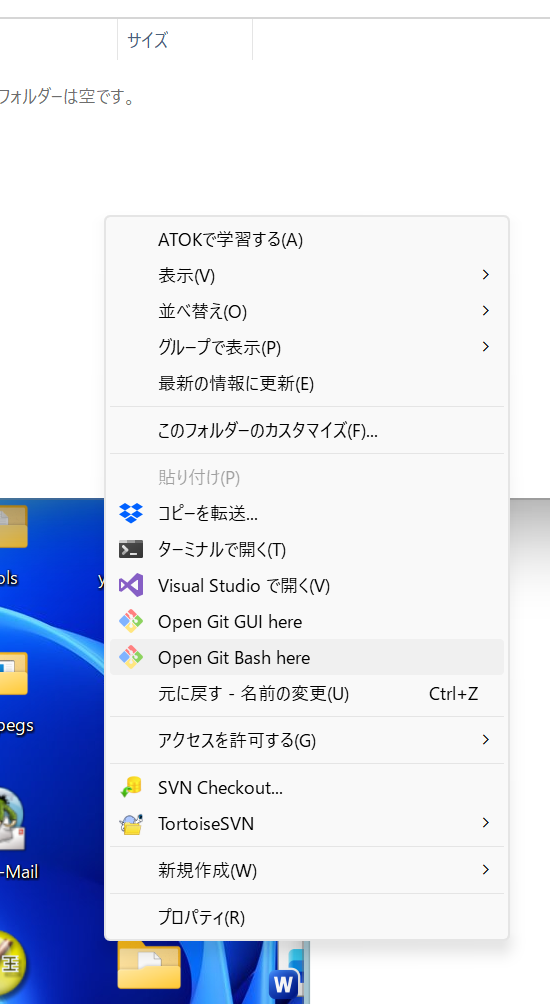
うっすら見えている”Open Git Bash here”です。まずcmakeが使えるのかの確認を、
jakeb@Orbit-11 MINGW64 /c/zxing-cpp
$ cmake --version
cmake version 4.2.0

CMake suite maintained and supported by Kitware (kitware.com/cmake).
バージョンは4.2.0ですね。
まずzxing-cppのGit RepositoryをGitHubからcloneします。
$ git clone https://github.com/zxing-cpp/zxing-cpp.git --recursive
Cloning into 'zxing-cpp'...
remote: Enumerating objects: 32545, done.
remote: Counting objects: 100% (2612/2612), done.
remote: Compressing objects: 100% (1182/1182), done.
remote: Total 32545 (delta 1807), reused 1559 (delta 1375), pack-reused 29933 (from 3)
Receiving objects: 100% (32545/32545), 251.81 MiB | 29.52 MiB/s, done.
Resolving deltas: 100% (21093/21093), done.
Updating files: 100% (2270/2270), done.
Submodule 'zint' (https://github.com/zint/zint.git) registered for path 'zint'
Cloning into 'C:/zxing-cpp/zxing-cpp/zint'...
remote: Enumerating objects: 4535, done.
remote: Counting objects: 100% (4535/4535), done.
remote: Compressing objects: 100% (3114/3114), done.
remote: Total 4535 (delta 3053), reused 2398 (delta 1327), pack-reused 0 (from 0)
Receiving objects: 100% (4535/4535), 22.45 MiB | 22.25 MiB/s, done.
Resolving deltas: 100% (3053/3053), done.
Submodule path 'zint': checked out '55541e139e62b9209b71cd9b0ba9010cec28b1d9'
git cloneのコマンドラインで、–recursiveが肝要です。これ忘れるとzint関連でerrorが出ます。
$ cmake -S zxing-cpp -B zxing-cpp.build -DCMAKE_BUILD_TYPE=Release
-- Building for: Visual Studio 17 2022
-- Selecting Windows SDK version 10.0.26100.0 to target Windows 10.0.26200.
-- The C compiler identification is MSVC 19.44.35222.0
-- The CXX compiler identification is MSVC 19.44.35222.0
-- Detecting C compiler ABI info
-- Detecting C compiler ABI info - done
-- Check for working C compiler: C:/Program Files/Microsoft Visual Studio/2022/Community/VC/Tools/MSVC/14.44.35207/bin/Hostx64/x64/cl.exe - skipped
-- Detecting C compile features
-- Detecting C compile features - done
-- Detecting CXX compiler ABI info
-- Detecting CXX compiler ABI info - done
-- Check for working CXX compiler: C:/Program Files/Microsoft Visual Studio/2022/Community/VC/Tools/MSVC/14.44.35207/bin/Hostx64/x64/cl.exe - skipped
-- Detecting CXX compile features
-- Detecting CXX compile features - done
-- Performing Test HAS_FILE_PREFIX_ARG
-- Performing Test HAS_FILE_PREFIX_ARG - Failed
-- Performing Test COMPILER_KNOWS_Os
-- Performing Test COMPILER_KNOWS_Os - Success
-- Could NOT find Doxygen (missing: DOXYGEN_EXECUTABLE)
-- Could NOT find PkgConfig (missing: PKG_CONFIG_EXECUTABLE)
INFO: OpenCV not found, skipping ZXingOpenCV example
-- Could NOT find PkgConfig (missing: PKG_CONFIG_EXECUTABLE)
-- Configuring done (27.5s)
-- Generating done (0.4s)
-- Build files have been written to: C:/zxing-cpp/zxing-cpp.build
つぎはコンパイル。
$  cmake --build zxing-cpp.build --config Release
MSBuild のバージョン 17.14.23+b0019275e (.NET Framework)

  1>Checking Build System
  Building Custom Rule C:/zxing-cpp/zxing-cpp/core/CMakeLists.txt
  cmake_pch.cxx
  Barcode.cpp
  BarcodeFormat.cpp
  BitMatrixIO.cpp
  CreateBarcode.cpp
  Error.cpp
  GTIN.cpp
  WriteBarcode.cpp
  ZXingCpp.cpp
  ZXingC.cpp
  HRI.cpp
  MultiFormatReader.cpp
  DMDataBlock.cpp
  ODDataBarExpandedBitDecoder.cpp
  QRVersion.cpp
  QRBitMatrixParser.cpp
  QRDataBlock.cpp
  QRDecoder.cpp
  QRReader.cpp
  コードを生成中...
   ODReader.cpp
途中略
C:\Program Files\Microsoft Visual Studio\2022\Community\VC\Tools\MSVC\14.44.35207\include\algorithm(620,52): warning C4805: '==': 演算中の 'const unsigned char' 型と 'const _Ty' 型の混用は安全ではありません [C:\zxing-cpp\zxing-cpp.build\core\ZXing.vcxproj]
C:\Program Files\Microsoft Visual Studio\2022\Community\VC\Tools\MSVC\14.44.35207\include\algorithm(620,52): warning C4805:         with [C:\zxing-cpp\zxing-cpp.build\core\ZXing.vcxproj]
C:\Program Files\Microsoft Visual Studio\2022\Community\VC\Tools\MSVC\14.44.35207\include\algorithm(620,52): warning C4805:         [ [C:\zxing-cpp\zxing-cpp.build\core\ZXing.vcxproj]
C:\Program Files\Microsoft Visual Studio\2022\Community\VC\Tools\MSVC\14.44.35207\include\algorithm(620,52): warning C4805:             _Ty=bool [C:\zxing-cpp\zxing-cpp.build\core\ZXing.vcxproj]
C:\Program Files\Microsoft Visual Studio\2022\Community\VC\Tools\MSVC\14.44.35207\include\algorithm(620,52): warning C4805:         ] [C:\zxing-cpp\zxing-cpp.build\core\ZXing.vcxproj]
  (ソース ファイル '../../zxing-cpp/core/src/oned/ODTelepenReader.cpp' をコンパイルしています)
      C:\Program Files\Microsoft Visual Studio\2022\Community\VC\Tools\MSVC\14.44.35207\include\algorithm(620,52):
      テンプレートインスタンス化コンテキスト (最初に最も古いもの) は
          C:\zxing-cpp\zxing-cpp\core\src\oned\ODTelepenReader.cpp(127,38):
          コンパイル対象の関数 テンプレート インスタンス化 '__int64 std::ranges::_Count_fn::operator ()<ZXing::BitArray&,bool,std::identity>(_Rng,const _Ty &,_Pj)' のリファレンスを確認してください
          with
          [
              _Rng=ZXing::BitArray &,
              _Ty=bool,
              _Pj=std::identity
          ]
          C:\Program Files\Microsoft Visual Studio\2022\Community\VC\Tools\MSVC\14.44.35207\include\algorithm(591,20):
          コンパイル対象の関数 テンプレート インスタンス化 '__int64 std::ranges::_Count_fn::_Count_unchecked<const unsigned char*,const unsigned char*,_Ty,_Fn>(_It,const _Se,const _Ty &,_Pj)' のリファレンスを確認してください
          with
          [
              _Ty=bool,
              _Fn=std::identity,
              _It=const unsigned char *,
              _Se=const unsigned char *,
              _Pj=std::identity
          ]

途中略
  eci.c
  pdf417.c
  ZXing.vcxproj -> C:\zxing-cpp\zxing-cpp.build\core\Release\ZXing.lib
  Building Custom Rule C:/zxing-cpp/zxing-cpp/example/CMakeLists.txt
  ZXingBarcodeFormat.cpp
  ZXingBarcodeFormat.vcxproj -> C:\zxing-cpp\zxing-cpp.build\example\Release\ZXingBarcodeFormat.exe
  Building Custom Rule C:/zxing-cpp/zxing-cpp/wrappers/c/CMakeLists.txt
  ZXingCTest.c
  ZXingCTest.vcxproj -> C:\zxing-cpp\zxing-cpp.build\wrappers\c\Release\ZXingCTest.exe
  Building Custom Rule C:/zxing-cpp/zxing-cpp/example/CMakeLists.txt
  ZXingReader.cpp
  ZXingReader.vcxproj -> C:\zxing-cpp\zxing-cpp.build\example\Release\ZXingReader.exe
  Building Custom Rule C:/zxing-cpp/zxing-cpp/example/CMakeLists.txt
  ZXingWriter.cpp
  ZXingWriter.vcxproj -> C:\zxing-cpp\zxing-cpp.build\example\Release\ZXingWriter.exe
  Building Custom Rule C:/zxing-cpp/zxing-cpp/CMakeLists.txt
ワーニング出ていますけど、本質的に問題無くbuild(compile and link)が終わりました。生成物は、
jakeb@Orbit-11 MINGW64 /c/zxing-cpp
$ find . -name "*.exe" -print
./zxing-cpp.build/CMakeFiles/4.2.0/CompilerIdC/CompilerIdC.exe
./zxing-cpp.build/CMakeFiles/4.2.0/CompilerIdCXX/CompilerIdCXX.exe
./zxing-cpp.build/example/Release/ZXingBarcodeFormat.exe
./zxing-cpp.build/example/Release/ZXingReader.exe
./zxing-cpp.build/example/Release/ZXingWriter.exe
./zxing-cpp.build/wrappers/c/Release/ZXingCTest.exe
./zxing-cpp.build/_deps/stb-src/tests/oversample/oversample.exe

jakeb@Orbit-11 MINGW64 /c/zxing-cpp
$ find . -name "*.lib" -print
./zxing-cpp.build/core/Release/ZXing.lib
でわかります。ZXing.lib他ZXingReader.exe、ZXingWriter.exe等が生成されています。ZXingReader.exeを動かして見ましょうかね。
jakeb@Orbit-11 MINGW64 /c/zxing-cpp
$ cd ./zxing-cpp.build/example/Release

jakeb@Orbit-11 MINGW64 /c/zxing-cpp/zxing-cpp.build/example/Release
$ ./zxingreader
Usage: C:\zxing-cpp\zxing-cpp.build\example\Release\zxingreader.exe [options] <image file>...
    -fast      Skip some lines/pixels during detection (faster)
    -norotate  Don't try rotated image during detection (faster)
    -noinvert  Don't search for inverted codes during detection (faster)
    -noscale   Don't try downscaled images during detection (faster)
    -formats <FORMAT[,...]>
               Only detect given format(s) (faster)
    -single    Stop after the first barcode is detected (faster)
    -ispure    Assume the image contains only a 'pure'/perfect code (faster)
    -errors    Include barcodes with errors (like checksum error)
    -binarizer <local|global|fixed>
               Binarizer to be used for gray to binary conversion
    -mode <plain|eci|hri|escaped>
               Text mode used to render the raw byte content into text
    -1         Print only file name, content/error on one line per file/barcode (implies '-mode Escaped')
    -symbol    Print the detected symbol (if available)
    -json      Print a complete JSON formatted serialization
    -bytes     Write (only) the bytes content of the symbol(s) to stdout
    -pngout <file name>
               Write a copy of the input image with barcodes outlined by a green line
    -help      Print usage information
    -version   Print version information

Supported formats are (Symbology : Variants):
       Code 39 : Code 32, Code 39 Extended, Pharmazentralnummer, Code 39 Standard,
       Telepen : Telepen Alpha, Telepen Numeric,
      Code 128 :
       EAN/UPC : EAN-13, EAN-8, UPC-A, UPC-E, ISBN,
       Codabar :
       Code 93 :
           ITF : ITF-14,
        PDF417 : Compact PDF417, MicroPDF417,
       QR Code : QR Code Model 1, QR Code Model 2, Micro QR Code, rMQR Code,
      MaxiCode :
 Other barcode : DX Film Edge,
   Data Matrix :
       DataBar : DataBar Expanded Stacked, DataBar Stacked Omni, DataBar Expanded, DataBar Limited, DataBar Omni, DataBar Stacked,
         Aztec : Aztec Code, Aztec Rune,

BarcodeFormats can be lowercase, with or without any of ' -_/', separated by ',' or '|'
作ってあるQRcodeを含んだ画像ファイルを食わせてみましょう。
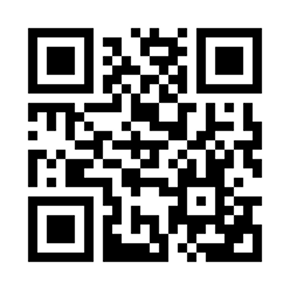
たとえばこれをqr.png等のファイル名で保存しておいて、zxingreader.exeと同じ階層において、
$ ./zxingreader qr.png
Text:       "https://ghost.mydns.jp/kono.php"
Bytes:      68 74 74 70 73 3A 2F 2F 67 68 6F 73 74 2E 6D 79 64 6E 73 2E 6A 70 2F 6B 6F 6E 6F 2E 70 68 70
Format:     QR Code
Symbology:  QR Code
Identifier: ]Q1
Content:    Text
HasECI:     false
Position:   18x18 168x18 168x168 18x168
Rotation:   0 deg
IsMirrored: false
IsInverted: false
ECLevel:    L
Version:    2
Extra:      {"DataMask":2,"UEC":1.00,"Version":"2","ECLevel":"L"}
中身のTextがデコードされています。Readerですからね。次にWriterですね。
$ ./zxingwriter
Usage: C:\zxing-cpp\zxing-cpp.build\example\Release\zxingwriter.exe [-options <creator-options>] [-scale <factor>] [-binary] [-noqz] [-hrt] [-invert] <format> <text> <output>
    -options   Comma separated list of format specific options and flags
    -scale     module size of generated image / negative numbers mean 'target size in pixels'
    -rotate    Rotate image by given angle (90, 180 or 270)
    -binary    Interpret <text> as a file name containing binary data
    -noqz      Print barcode without quiet zone
    -hrt       Print human readable text below the barcode (if supported)
    -invert    Invert colors (switch black and white)
    -help      Print usage information
    -version   Print version information

Supported formats are (Symbology : Variants):
       Code 39 : Code 32, Code 39 Extended, Pharmazentralnummer, Code 39 Standard,
       Telepen : Telepen Alpha, Telepen Numeric,
      Code 128 :
       EAN/UPC : EAN-13, EAN-2, EAN-5, EAN-8, UPC-A, UPC-E, ISBN,
       Codabar :
       Code 93 :
           ITF : ITF-14,
        PDF417 : Compact PDF417, MicroPDF417,
       QR Code : QR Code Model 2, Micro QR Code, rMQR Code,
      MaxiCode :
  DX Film Edge :
   Data Matrix :
       DataBar : DataBar Expanded Stacked, DataBar Stacked Omni, DataBar Expanded, DataBar Limited, DataBar Omni, DataBar Stacked,
         Aztec : Aztec Code, Aztec Rune,

Format can be lowercase letters, with or without any of ' -_/'.
Output format is determined by file name, supported are png, jpg and svg.
これを参考にして。例えば、
$ ./zxingwriter "QR Code Model 2" "https://ghost.mydns.jp/" test.pngとすると、

が得られます。これをReaderに食わせれば、
$ ./zxingreader test.png
Text:       "https://ghost.mydns.jp/"
Bytes:      68 74 74 70 73 3A 2F 2F 67 68 6F 73 74 2E 6D 79 64 6E 73 2E 6A 70 2F
Format:     QR Code
Symbology:  QR Code
Identifier: ]Q1
Content:    Text
HasECI:     false
Position:   4x4 29x4 29x29 4x29
Rotation:   0 deg
IsMirrored: false
IsInverted: false
ECLevel:    M
Version:    2
Extra:      {"DataMask":2,"UEC":1.00,"Version":"2","ECLevel":"M"}
当たり前ですが、元に戻ります。一応ReaderもWriterも機能しているようですね。このサイトでは、C++ Builder CEで色々なプログラムを作るという趣旨で記事を書いていますが、ZXing-cppをソースレベルでC++ Builder CEに取り込むことはまだできていません。状況的にはできてもいいはずなんですが……。折角できたバイナリをPopenして、C++ Builder CEのGUIなプログラムから使う方法は、別の記事で書くかもしれません。
コメント