#1 Scan Projectを作ろう の1 メインロジック概説
下図のようなプログラムを作る。
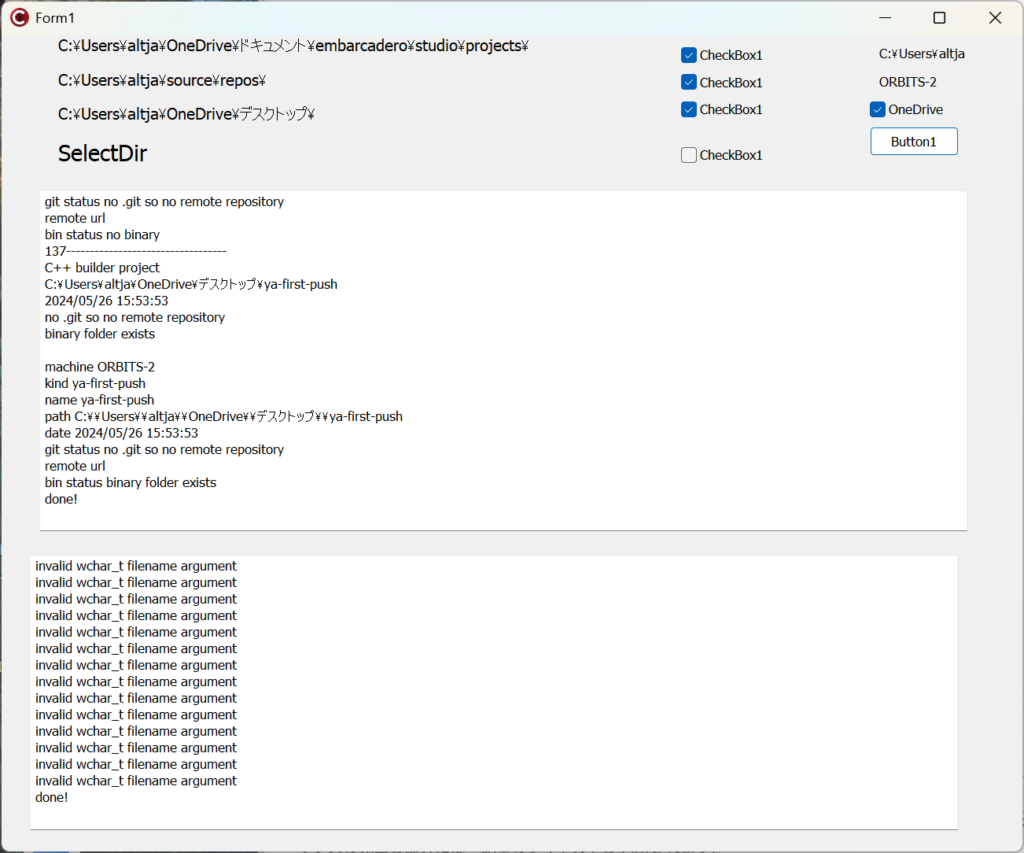
このプログラムは、ハードディスク内部のスタートディレクトリx3を起点として、スキャン(走査)を開始して、再帰的に階層をたどって、そのディレクトリがC++ Builderのディレクトリか、あるいはMSVCのディレクトリかを判定し、プロジェクトファイルのタイムスタンプや、gitでの管理状況、さらにはremote repositoryの有無等を調べて、結果をエクセルのファイルに追記していくものである。結果の一例は、
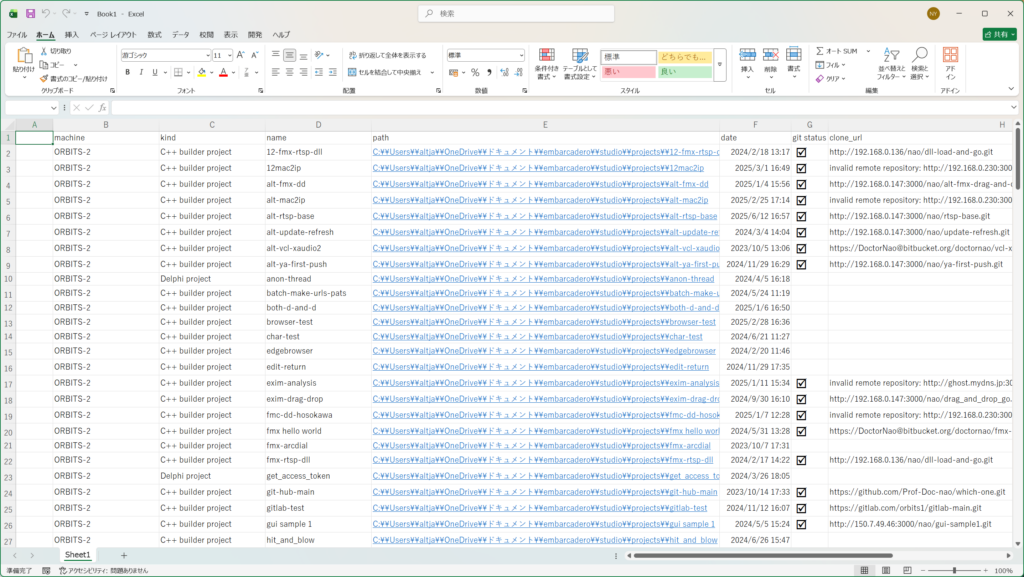
となり、“path”はhyperlinkとして書いているので、ダブルクリックでそのディレクトリへ飛んでいける。この画面で”検索”することでうろ覚えのプロジェクト名から拾い出すこともできる。
メインロジックから紹介しよう。唯一のボタンをクリックして動作スタートなのだが、
void __fastcall TForm1::Button1Click(TObject *Sender)
{
	if( CheckBox1->Checked )
		walk_dir_recursive(Label1->Caption.c_str());
	if( CheckBox2->Checked )
		walk_dir_recursive(Label2->Caption.c_str());
	if( CheckBox3->Checked )
		walk_dir_recursive(Label3->Caption.c_str());
	if( CheckBox4->Checked ){
		UnicodeString dir;
		TSelectDirExtOpts options = TSelectDirExtOpts() << sdNewUI << sdNewFolder;
		if (SelectDirectory(L"フォルダを指定して下さい。", "::" + System::Sysutils::GUIDToString(CLSID_MyComputer), dir, options)){
			walk_dir_recursive(dir.c_str());
		}
	}
	Memo1->Lines->Add("done!");
	Memo2->Lines->Add("done!");
}
とあるように、walk_dir_recursive(StartDirectory)というもっともな関数呼び出しである。その実体は、
void walk_dir_recursive(const fs::path& dir)
{
	int i = 1;
	int invindex = 1;
	   TDateTime t;

    	std::string kind;
	std::string path;
	//std::string date;
	std::string gitstatus;
	std::string remoteurl;
	std::string binarystatus;
	std::string mdate;


	for ( auto ent : fs::recursive_directory_iterator(dir) ) {
	try {
	  fs::path p = ent;
	  //if( fs::is_directory(ent) )
	  //	Form1->Memo1->Lines->Add(std::string("[" + p.string()+ "]").c_str()); // where am I
	  //end_with使えるの?
	  //std::string oops;
	  //oops.ends_with(".cbproj");
	  //if( fs::is_directory(ent)==false && ((p.string().find(".cbproj.local") != std::string::npos) || (p.string().find(".sln") != std::string::npos) )){

	  const char* trailer = p.string().c_str();

	  if( *trailer == '_')
		continue;
	  if( fs::is_directory(ent)==false && ((ends_with(p.string(),".cbproj")) || (ends_with(p.string(),".sln")) || (ends_with(p.string(),".dproj")))){
			// まず上のディレクトリの絶対パスを得る。
			//Form1->Memo1->Lines->Add(p.string().c_str());
			std::string parent = absolute(ent.path().parent_path()).string();
			Form1->Memo1->Lines->Add(IntToStr(i++) + "----------------------------------");

			if(ends_with(p.string(),".cbproj")){
				kind = "C++ builder project";
				Form1->Memo1->Lines->Add("C++ builder project");
			}
			else if(ends_with(p.string(),".sln")){
				kind = "Visual Studio Solution";
				Form1->Memo1->Lines->Add("Visual Studio Solution");
			}
			else if(ends_with(p.string(),".dproj")){
				kind = "Delphi project";
				Form1->Memo1->Lines->Add("Delphi project");
			}

			path = parent;
			Form1->Memo1->Lines->Add(parent.c_str()); //p.string<wchar_t>()


			std::filesystem::file_time_type ftime = std::filesystem::last_write_time(p);

			#if defined(PUTTIME)
			std::stringstream ss;
			//ss << std::format("File write time is {}\n", ftime);
			print_datetime( ss,ftime);
			Form1->Memo1->Lines->Add(ss.str().c_str());
			#else
			time_t ftimet = std::filesystem::file_time_type::clock::to_time_t(ftime);
			t = UnixToDateTime((__int64)ftimet,false);
			Form1->Memo1->Lines->Add(t.DateTimeString());
			std::string date(AnsiString(t.DateTimeString()).c_str());

			#endif
			std::filesystem::current_path(ent.path().parent_path());//そこへ移動して.gitなるディレクトリを探す
			if( std::filesystem::exists(".git") ){
				Form1->Memo1->Lines->Add(".git found");
				gitstatus = ".git found";
				std::string remoterep = extracturl();

				if( remoterep.find("invalid") != std::string::npos){
					Form1->Memo2->Lines->Add(IntToStr(invindex++) + " [" + IntToStr(i-1) + "] ----------------------------------");
					Form1->Memo2->Lines->Add(parent.c_str());
					Form1->Memo2->Lines->Add(remoterep.c_str());
					//Form1->Memo2->Lines->Add("");
				}
				Form1->Memo1->Lines->Add(remoterep.c_str());
				remoteurl = remoterep.c_str();

			}
			else {
				Form1->Memo1->Lines->Add("no .git so no remote repository");
				gitstatus = "no .git so no remote repository";
				remoteurl = "";
			}

			if( std::filesystem::exists("win32") || std::filesystem::exists("x64") ){
				Form1->Memo1->Lines->Add("binary folder exists");
				binarystatus = "binary folder exists";
			}
			else {
				Form1->Memo1->Lines->Add("no binary");
				binarystatus = "no binary";
			}
			Form1->Memo1->Lines->Add("");
		   Dumpaentry(kind,path,date,gitstatus,remoteurl,binarystatus);
		continue;
	  }
	  Application->ProcessMessages();
	}catch( std::invalid_argument const& ex ) {

	Form1->Memo2->Lines->Add(ex.what());

	}

  }

}
である。再帰的処理のためにfs系とstd::stringを多用しています。コメントは覚え書きのためにわざと残しました。消してしまうと、”なんでこうなんだっけ”となるからだ。中盤で、
			if(ends_with(p.string(),".cbproj")){
				kind = "C++ builder project";
				Form1->Memo1->Lines->Add("C++ builder project");
			}
			else if(ends_with(p.string(),".sln")){
				kind = "Visual Studio Solution";
				Form1->Memo1->Lines->Add("Visual Studio Solution");
			}
			else if(ends_with(p.string(),".dproj")){
				kind = "Delphi project";
				Form1->Memo1->Lines->Add("Delphi project");
			}
という部分がありますが、ここでC++ Builder Projectか、MSVCのsolutionか、Delphiのプロジェクトかを捉えています。さらに少し下で、
			std::filesystem::current_path(ent.path().parent_path());//そこへ移動して.gitなるディレクトリを探す
			if( std::filesystem::exists(".git") ){
				Form1->Memo1->Lines->Add(".git found");
				gitstatus = ".git found";
				std::string remoterep = extracturl();

				if( remoterep.find("invalid") != std::string::npos){
					Form1->Memo2->Lines->Add(IntToStr(invindex++) + " [" + IntToStr(i-1) + "] ----------------------------------");
					Form1->Memo2->Lines->Add(parent.c_str());
					Form1->Memo2->Lines->Add(remoterep.c_str());
					//Form1->Memo2->Lines->Add("");
				}
				Form1->Memo1->Lines->Add(remoterep.c_str());
				remoteurl = remoterep.c_str();

			}
			else {
				Form1->Memo1->Lines->Add("no .git so no remote repository");
				gitstatus = "no .git so no remote repository";
				remoteurl = "";
			}
という部分で、.gitフォルダーの有無を調べています。
結果をExcelのファイルへ書く方法については次回以降で。バイナリないしプロジェクト全体のソースコードのご希望があれば是非コメント欄へ。希望が多ければ掲載するかもです。

コメント